First, we will look at the MATCH piece in this formula it returns the position of a value in a range of cells.
In the match you give the value you want the match to find, then the range the value can be found in and how you want the match to evaluate this can be either ascending, descending or exact, we will focus on exact since this is most common and give the formula a 0 which means an exact match. The match formula will return the position
Next is the INDEX piece which will return the specific value of a range that corresponds to the position of the match.
In the index formula you give a range of cells then the row in which you would like returned.
When put these two together you can have your formula look at a value, find that value in a range and then return another value in that same position from another range in table.
How these fit together is by adding the Match formula to the ending value of the index formula. So, where you typically give the index formula the row number you are looking for the match formula is going to provide that.
Here is an example:
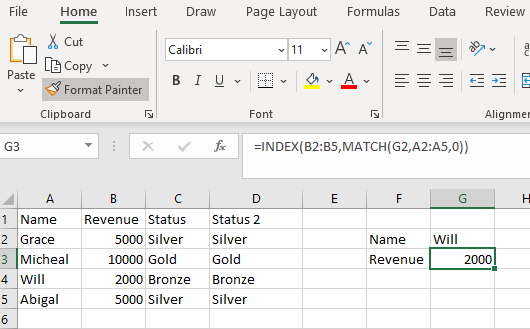
The index is looking in the Revenue column and will return the row that the match gives it based on the Name identified in the cell G2.

 DiG with Data